Analytics Hub: Architecture Design
Target architecture for one governed, single sign-on portal that serves native BI embeds and sealed AI-agent-built reports side by side, with the hub, not the report, as the enforcement point for identity, data security, and egress.
01Purpose
This design describes the target architecture for an organization-wide Analytics Hub: one governed, single sign-on (SSO) web portal where every user goes to find analytics. The hub serves two kinds of content side by side:
- Native platform content embedded from tools the organization already owns (Power BI / Fabric, Databricks AI/BI, Snowflake-backed apps, Salesforce, and others).
- Agent-built HTML reports: custom, advanced analytics sites generated by AI agents and tailored to a person, team, or question.
The core problem is not building the reports. AI agents can already do that quickly. The core problem is security, control, and governance: who can see which data, where that data is allowed to flow, and what outbound requests generated code is allowed to make. The architecture solves this by making the hub, not the report, the enforcement point.
Design goals
| Goal | What it means in practice |
|---|---|
| One front door | Users sign in once with Microsoft 365 / Entra ID and see every report and tool they are entitled to. |
| Identity everywhere | The signed-in user's identity is carried all the way to the data platform so row- and column-level security is enforced at the source, not reimplemented in the report. |
| Untrusted-by-default reports | Agent-generated HTML is treated like third-party code: isolated, unable to call the internet, and unable to hold credentials. |
| Pluggable platforms | Adding Snowflake, Databricks, Fabric, Salesforce, or a new tool is a connector registration, not a new portal. |
| Evidence by default | Every view, query, build, and publish event is logged and attributable to a person. |
Non-goals
- Replacing the source platforms' security models. The hub defers to Unity Catalog, Snowflake roles and policies, OneLake security, and Power BI RLS rather than duplicating them.
- Letting agents run arbitrary SQL from the browser at view time.
- Serving anonymous or public users. An external-user variant is listed under Open Decisions but is out of scope for v1.
02Architecture at a Glance
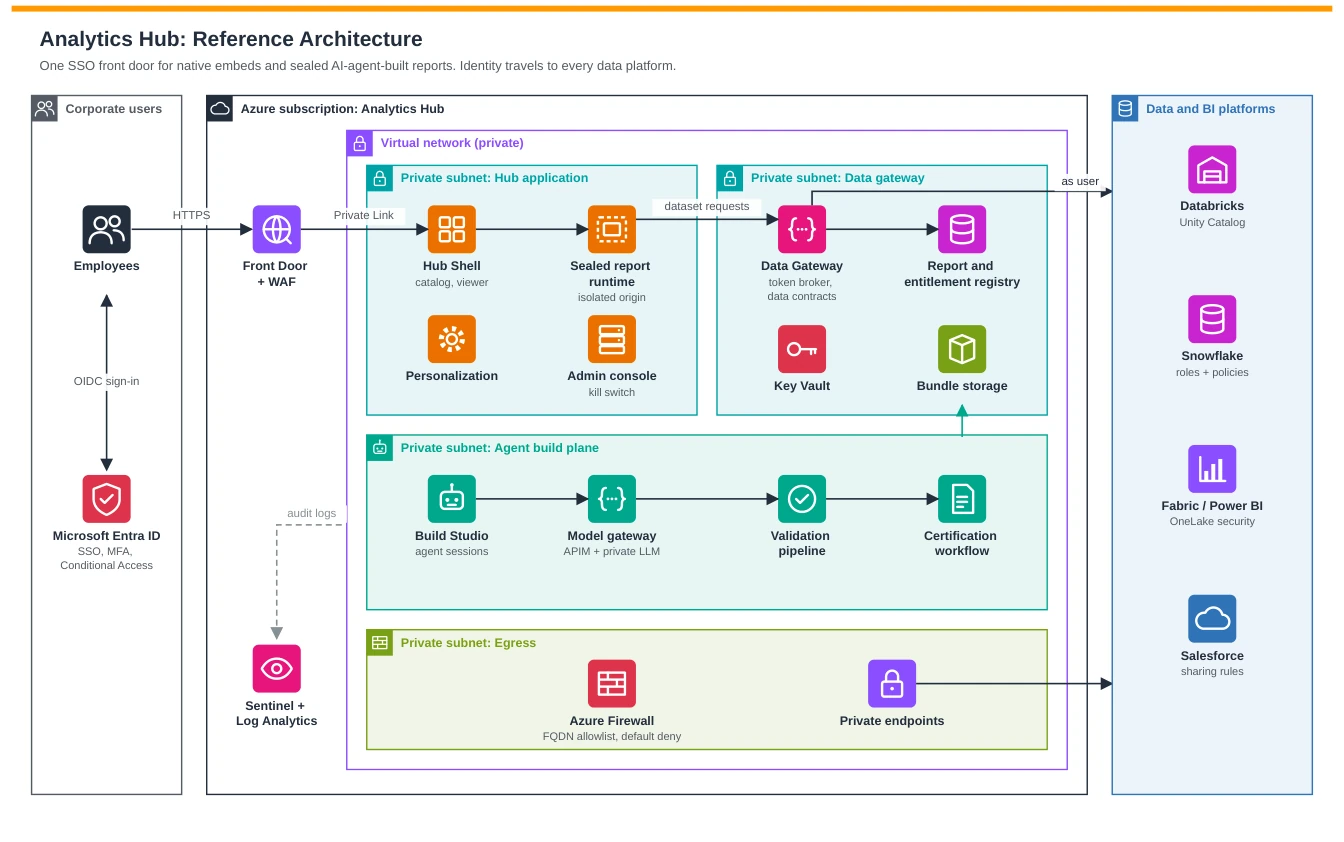
The design has six layers:
- Identity and access: Entra ID, Conditional Access, groups
- Edge and network: Front Door, WAF, private endpoints, egress firewall
- Hub application: shell, catalog, viewer, personalization
- Data gateway: token broker, query allowlist, caching, masking fallback
- Agent build plane: studio, model gateway, validation pipeline, registry
- Platform connectors: Databricks, Snowflake, Fabric / Power BI, Salesforce, others
03Identity and Access Layer
Single sign-on
The hub is registered as an enterprise application in Microsoft Entra ID and uses OpenID Connect (authorization code with PKCE) for sign-in. Users never create a hub password; their Microsoft 365 identity is the hub identity.
Conditional Access sits in front of the hub. Microsoft describes Conditional Access as its Zero Trust policy engine, with policies that can require MFA, compliant devices, or approved locations before granting access. Because any Entra-registered application can be targeted by a policy, the hub gets the same posture as Microsoft 365 itself. Recommended baseline:
| Policy | Target | Control |
|---|---|---|
| CA‑HUB‑01 | All hub users | Require MFA |
| CA‑HUB‑02 | Users opening Confidential or Restricted reports | Require compliant or hybrid-joined device (via authentication context) |
| CA‑HUB‑03 | Hub admins and report certifiers | Require phishing-resistant authentication strength |
| CA‑HUB‑04 | All users | Block legacy authentication; block high sign-in risk |
Authorization model: two keys
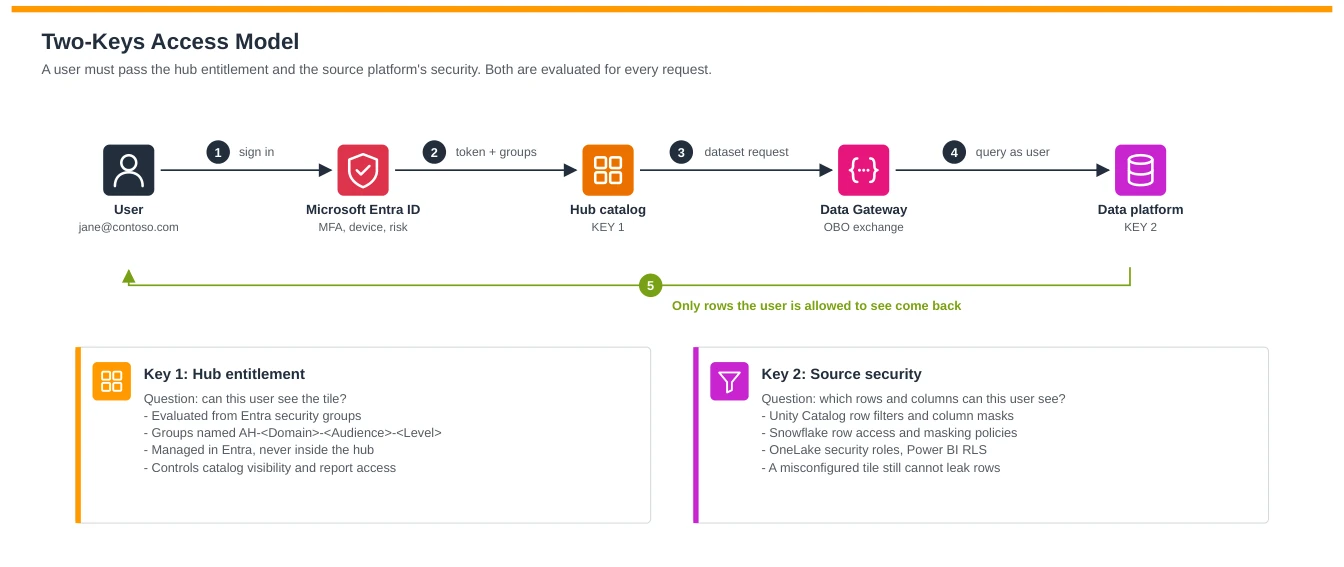
Authorization is evaluated in two places, and both must allow access:
- Hub entitlement (can you see the tile?): The hub reads the user's Entra security group memberships and matches them against the Entitlement Registry. A report or tool appears in the catalog only if the user is in an allowed group.
- Source entitlement (can you see the rows?): When data is fetched, the user's identity is passed to the platform, which applies its own row filters, column masks, and object grants.
This "two keys" design means a misconfigured hub tile cannot leak data. If the hub shows a report to the wrong person, the platform still returns only the rows that person is allowed to see.
Groups follow a simple naming convention so that access is managed in Entra, not inside the hub:
AH-<Domain>-<Audience>-<Level>

e.g. AH-Finance-FPA-Viewer, AH-Finance-FPA-Builder, AH-Sales-NA-Viewer
Identity propagation: the token broker
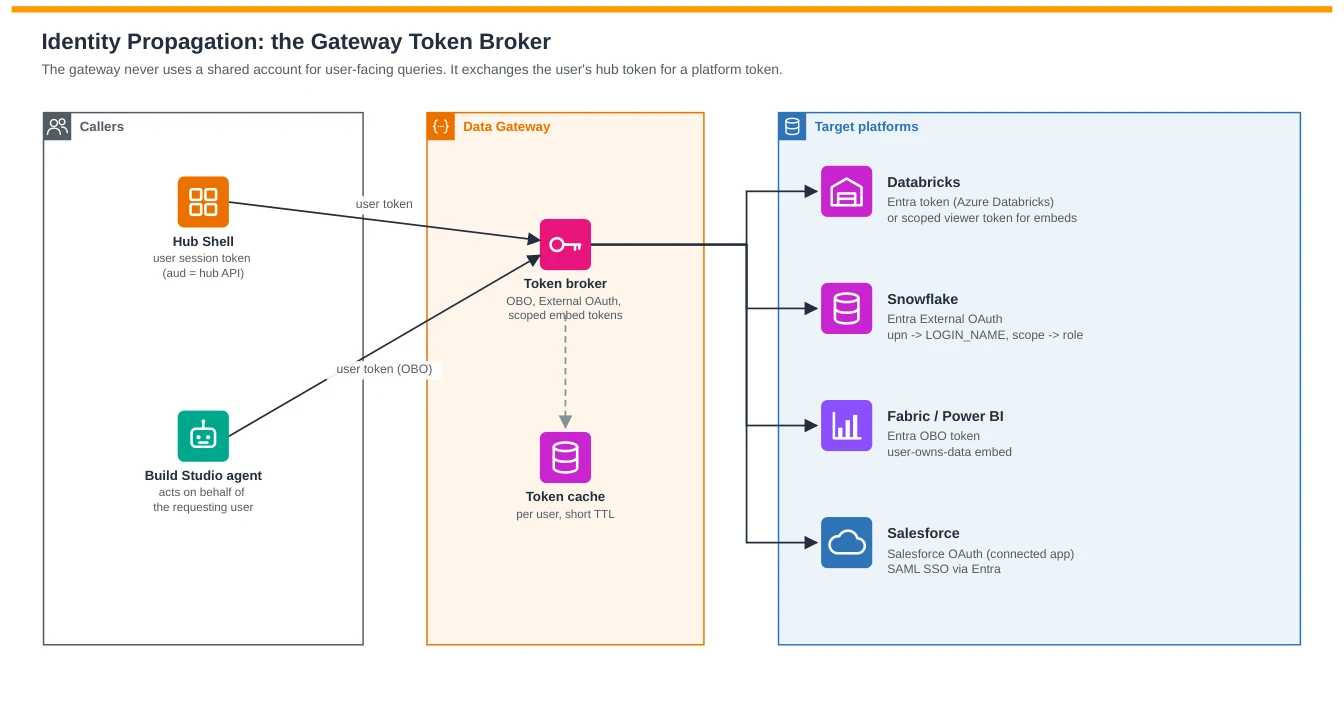
The hub's data gateway is the only component that talks to data platforms. It never uses a shared "god" account for user-facing queries. Instead, it exchanges the user's hub token for a platform-specific token:
- On-Behalf-Of (OBO): Microsoft's OBO flow lets a middle-tier API pass "a user's identity and permissions through the request chain" using delegated scopes. The gateway uses OBO for Entra-native targets (Fabric, Power BI REST, Azure Databricks, and Snowflake configured for Entra External OAuth).
- Scoped service tokens: Where a platform's embed model requires a service principal (for example, Databricks embedding for external users), the gateway mints a short-lived, user-scoped token and stamps the viewer identity into it so the platform's audit log still shows who viewed what.
- Vendor OAuth: For SaaS platforms outside Entra (for example, Salesforce APIs), the gateway uses that platform's OAuth with the user's federated identity.
Agents follow the same rule. Microsoft's Entra Agent ID guidance describes agents acquiring downstream tokens via OBO on behalf of the signed-in user. The design adopts this so that an agent building a report for Jane can only see data Jane can see.
04Edge and Network Layer
The network layer is where "control data flow and outbound requests" is enforced at the infrastructure level, independent of any code the agent writes.
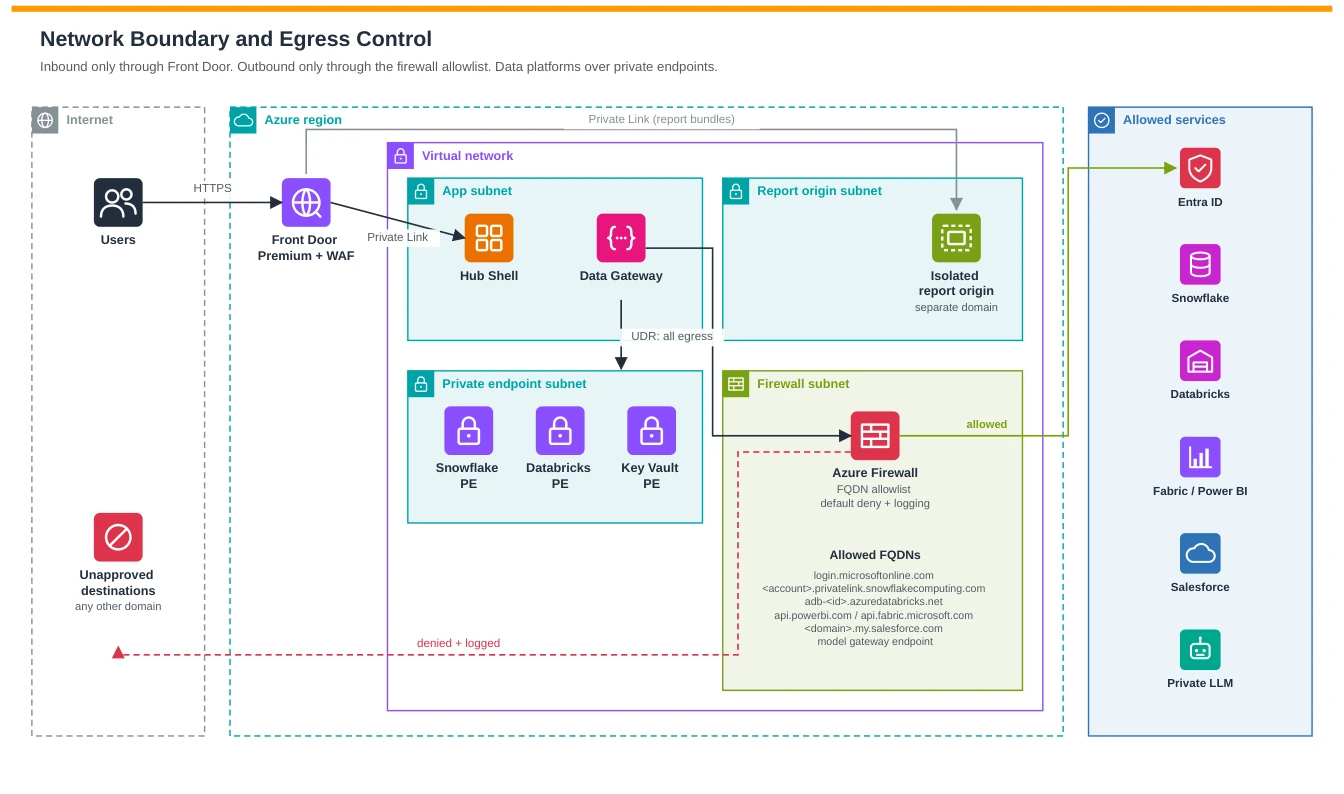
Inbound
- Azure Front Door Premium with WAF terminates TLS and filters traffic. Front Door Premium can reach origins over Private Link so the origin is not publicly exposed, and Microsoft recommends restricting direct origin access so traffic only arrives via Front Door.
- The hub shell, gateway, and report-hosting origin run in a private virtual network (Azure Container Apps or App Service with VNet integration).
Outbound (egress)
- All outbound traffic from hub workloads routes through Azure Firewall using user-defined routes, the standard force-tunnel pattern for controlled egress.
- The firewall uses an FQDN allowlist limited to: Entra login endpoints, the organization's Snowflake account URL, Databricks workspace URLs, Fabric / Power BI API endpoints, Salesforce My Domain, and the approved model endpoint. Everything else is denied and logged.
- Private endpoints are used for Snowflake (Azure Private Link), Azure Databricks, Key Vault, and Storage wherever supported, with public network access disabled on those services.
Browser-level egress control
Network controls stop the server from calling the internet. Browser controls stop the generated HTML from doing so. This is covered in the Agent-Built Report Runtime section.
05Hub Application Layer
| Component | Responsibility |
|---|---|
| Hub Shell | Single-page app. Sign-in, catalog, search, favorites, report viewer frame, personalization settings. |
| Catalog Service | Builds the user's personal catalog by intersecting their Entra groups with the Entitlement Registry. |
| Viewer | Hosts each report or tool in an isolated iframe and brokers data to it (agent reports) or initializes vendor SDKs (native embeds). |
| Personalization Service | Stores per-user preferences (default filters, layout, pinned KPIs, theme) as JSON, separate from the report code. |
| Admin Console | Connector registration, entitlement mapping, report lifecycle actions, kill switch. |
Catalog experience
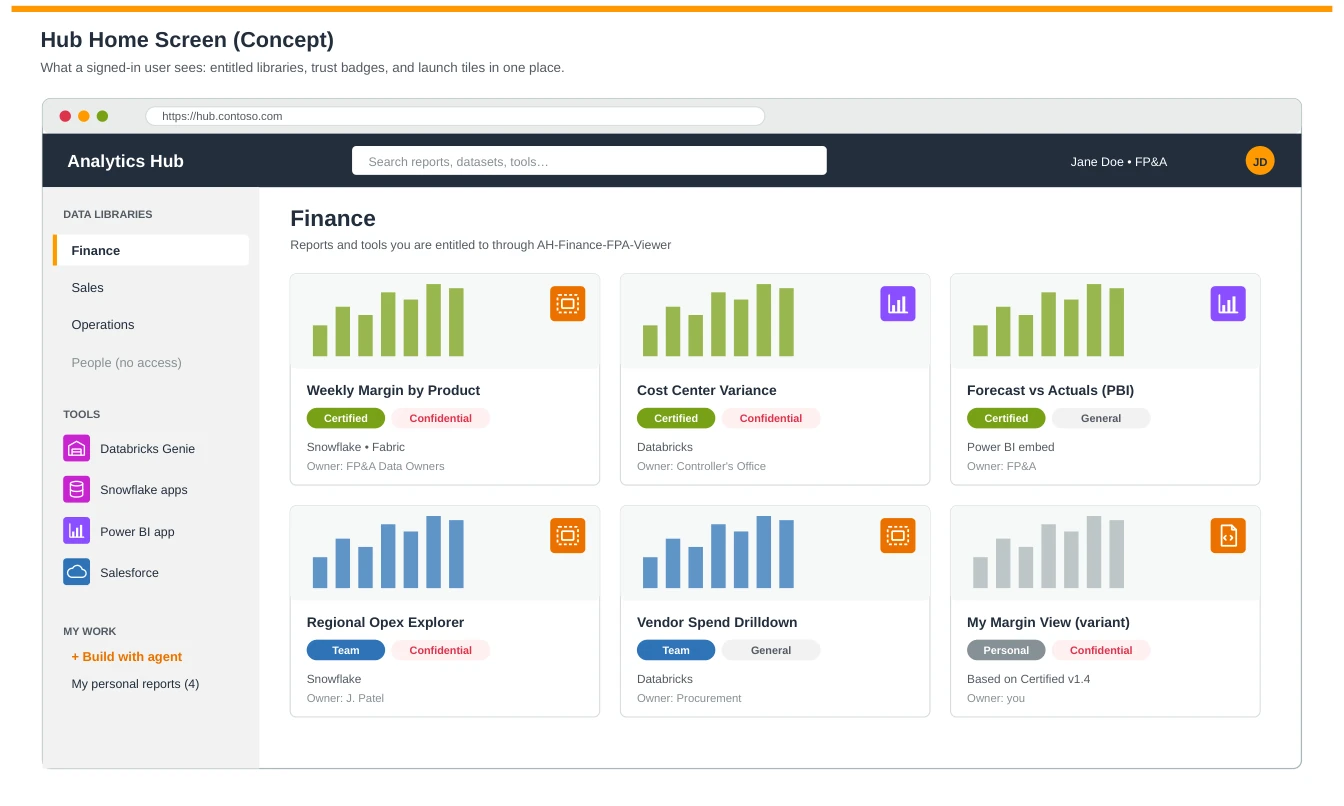
After sign-in, the user lands on a home page grouped by Data Libraries (Finance, Sales, Operations, and so on). Each library shows:
- Certified reports (badged)
- Team reports
- Personal / sandbox reports (only visible to the owner and named collaborators)
- Launch tiles for platform tools the user is entitled to (Databricks Genie space, Snowflake app, Power BI app, Salesforce dashboard)
Each tile displays owner, certification tier, sensitivity label, data sources, and last refresh. This makes governance visible to the user rather than hidden behind it.
Kill switch
Every report and connector has an enabled flag in the registry. Turning it off removes the tile from every catalog and causes the gateway to reject that report's data requests within one cache cycle. This is the incident-response lever.
06Agent-Built Report Runtime
This is the heart of the design. Agent-generated HTML is powerful, but it is code written by a model. The runtime therefore assumes the report could contain bugs, prompt-injected behavior, or attempts to send data somewhere it should not go.
The sealed-report pattern (default)
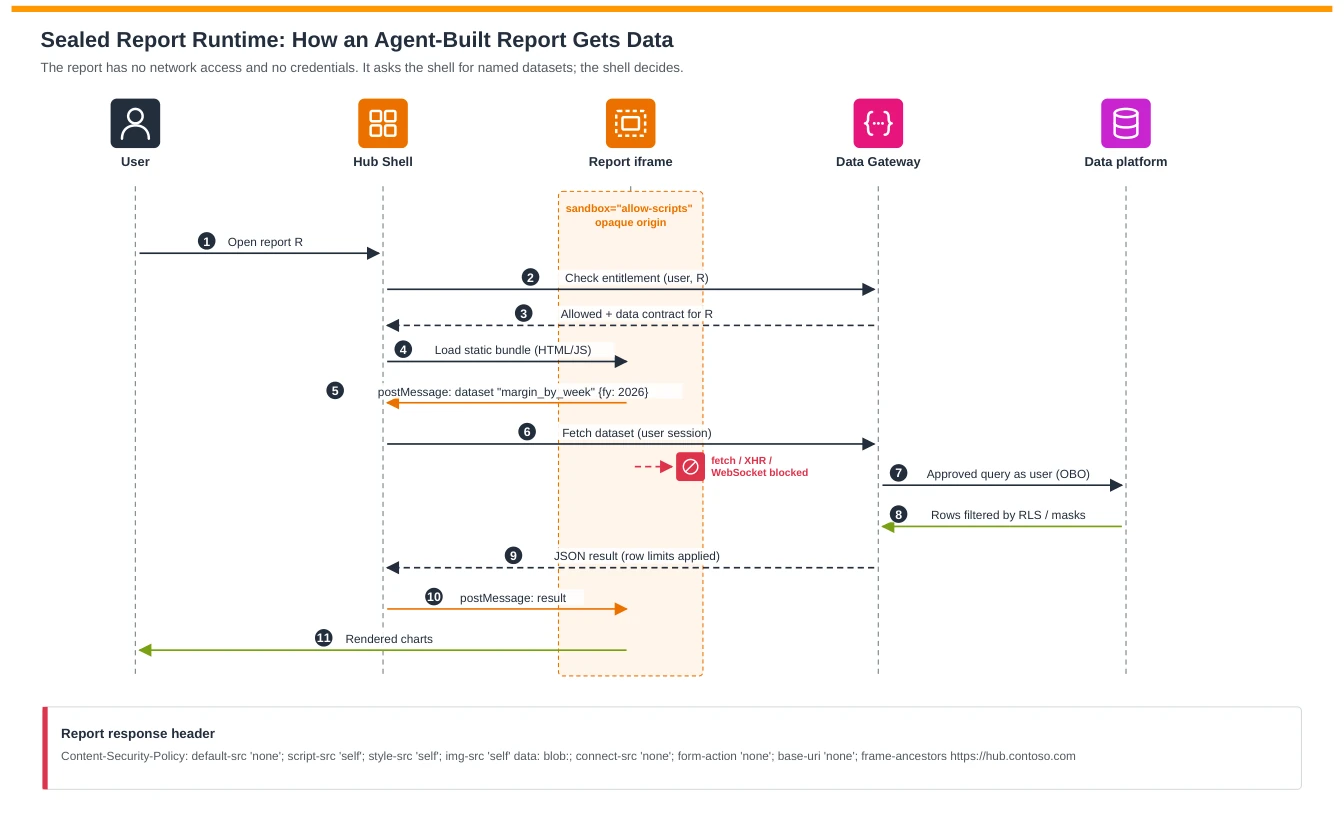
Key properties:
- The report has no network access. It is served with a Content Security Policy whose
connect-srcis'none'. MDN documents thatconnect-srcgovernsfetch(),XMLHttpRequest,WebSocket,EventSource, andsendBeacon(), so blocking it removes the script-driven exfiltration paths. - The report is sandboxed on a separate origin. It loads from a dedicated domain (for example
reports.contoso-usercontent.net) inside an iframe withsandbox="allow-scripts"and withoutallow-same-origin. That gives it a unique opaque origin with no access to hub cookies, storage, or the parent DOM. The W3C describes sandboxing as forcing content into a unique origin and blocking forms, popups, and navigation unless explicitly allowed. - The report holds no credentials. It only asks the shell for named datasets. The shell, which owns the user session, decides whether to fulfill the request.
- The report can only ask for what it declared. At certification, each report registers a data contract: the list of named datasets and allowed parameters. The gateway rejects anything not in the contract.
- Policies only get stricter. Per MDN, when multiple CSPs apply, additional policies can only further restrict the resource, so a report cannot loosen the hub's header with its own meta tag.
Content-Security-Policy:
  default-src 'none';
  script-src 'self';
  style-src 'self';
  img-src 'self' data: blob:;
  font-src 'self';
  connect-src 'none';
  form-action 'none';
  base-uri 'none';
  frame-ancestors https://hub.contoso.com;
Charting libraries (Chart.js, D3, ECharts, Plotly) are vendored into an approved, versioned library bundle served from 'self'. Agents may only reference libraries from that approved list.
The connected-report pattern (exception)
Some reports need live interactivity at scale (for example, drill-through on billions of rows). For those, a certified report may be granted connect-src https://gateway.contoso.com so it can call the gateway directly with a short-lived, audience-restricted token issued by the shell. This is an exception that requires Certified-tier review.
What the gateway enforces
| Control | Description |
|---|---|
| Entitlement check | User must be in an allowed group for the report. |
| Data contract | Only registered dataset names and parameter shapes are served. |
| Parameterized queries | Datasets are defined as parameterized SQL or semantic-model queries; no string concatenation from the client. |
| Identity passthrough | Queries execute under the user's identity (OBO or platform-native). |
| Row limits | Per-dataset maximum rows and payload size to prevent bulk extraction. |
| Export policy | Download/CSV is a gateway feature governed by sensitivity label, not something the report implements. |
| Audit | Each call logs user, report, dataset, parameters, row count, platform query ID. |
07Agent Build Plane
The build plane is where agents create and customize reports. It is separate from the runtime so that a compromised build session cannot change what is live in production.
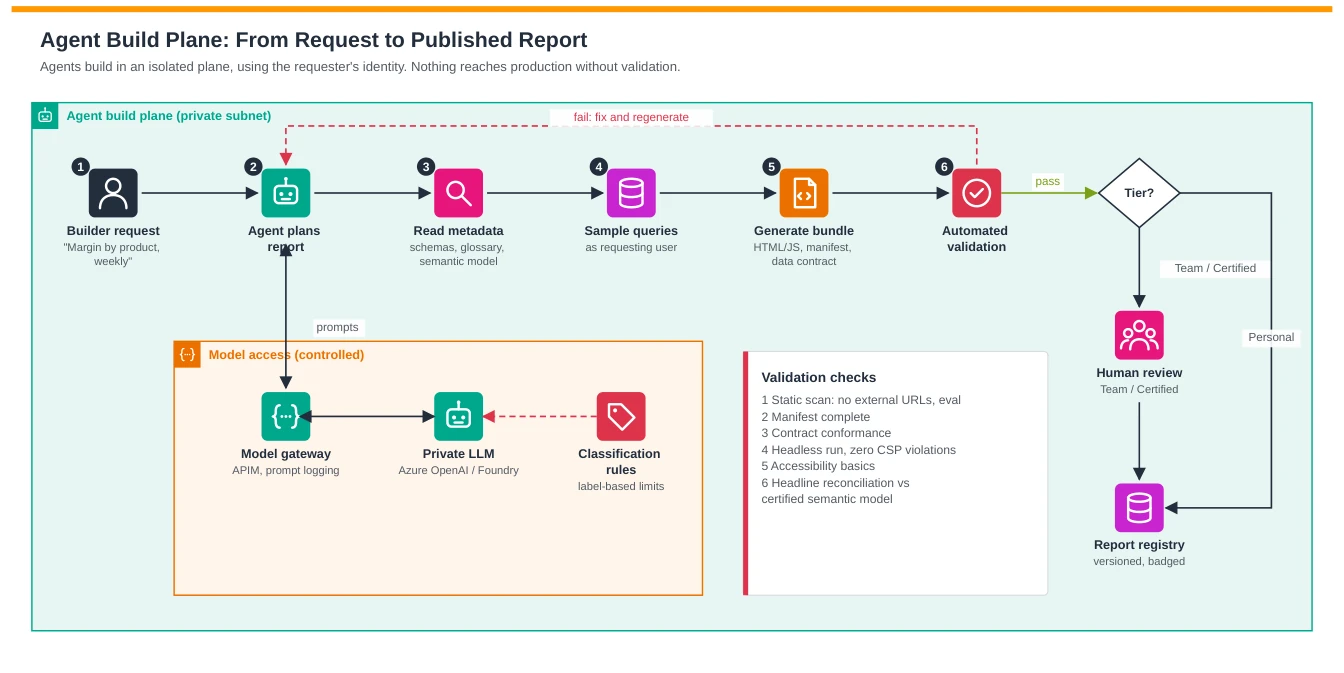
Model gateway
All agent calls to large language models go through an internal model gateway (for example Azure API Management in front of Azure OpenAI / Foundry, deployed in the private network). The model gateway:
- Logs prompts and responses for audit.
- Applies data classification rules: Restricted data never goes to the model; Confidential data goes only as aggregated samples or schema.
- Blocks the agent from calling arbitrary tools or URLs; the agent's toolset is limited to "read metadata," "run approved sample query," "write bundle files," and "run validation."
Microsoft Fabric's information protection settings include an option to allow Microsoft Purview to secure AI interactions for audit, DLP-style classification, and eDiscovery, which can be used where Fabric Copilot is part of the stack.
Automated validation checks
Before any bundle can publish, the pipeline runs:
- Static scan: reject any absolute URL,
eval,new Function, dynamicimport()from a non-self source, inline event handlers, or references to unapproved libraries. - Manifest check: the bundle must include
manifest.jsonwith owner, purpose, data contract, sensitivity label, intended audience group, and refresh expectations. - Contract check: every dataset the code requests must exist in the contract, and every contract dataset must map to an approved query in the semantic layer.
- Headless run: load the bundle in a headless browser under the production CSP; fail on any CSP violation report.
- Accessibility and render check: basic contrast, keyboard navigation, no console errors.
- Data-quality assertion: compare a few headline numbers against the certified semantic model (for example, total revenue matches the Finance-certified measure within tolerance).
Personalization without re-certification
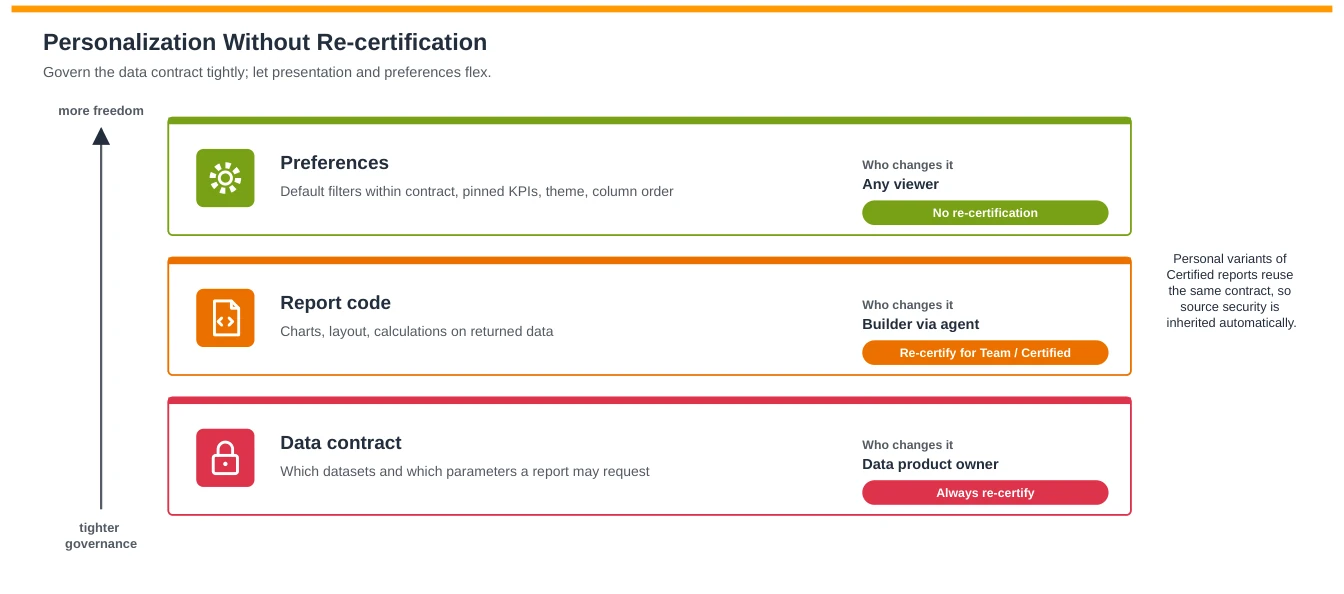
Users often want "the same report, my way." The design separates three layers so that customization does not reopen governance:
| Layer | Who can change it | Requires re-certification? |
|---|---|---|
| Data contract (which datasets, which filters are allowed) | Data product owner, via agent + review | Yes |
| Report code (charts, layout, calculations on returned data) | Builder via agent | Yes for Team/Certified; no for Personal |
| Preferences (default filters within contract, pinned KPIs, theme, column order) | Any viewer | No |
An agent can, for example, generate a personal variant of a certified report that rearranges visuals and adds a commentary panel. Because it uses the same data contract, it inherits the source security automatically and only needs Personal-tier validation.
Report registry
The registry is the system of record for everything published:
{
  "report_id": "fin-fpa-margin-weekly",
  "version": "1.4.0",
  "tier": "certified",
  "owner": "jane.doe@contoso.com",
  "data_product_owner": "fpa-data-owners@contoso.com",
  "audience_groups": ["AH-Finance-FPA-Viewer"],
  "sensitivity_label": "Confidential",
  "connectors": ["snowflake-prod", "fabric-finance"],
  "data_contract": [
    { "dataset": "margin_by_product_week",
      "params": { "fiscal_year": "int", "region": "string" } }
  ],
  "egress_mode": "sealed",
  "certified_by": "fin-certifiers@contoso.com",
  "certified_on": "2026-11-14",
  "review_due": "2027-05-14",
  "enabled": true
}08Platform Integration Examples
Each platform plugs into the hub through a connector registered in the Admin Console. A connector declares: the auth pattern, the identity mapping, where row-level security lives, embed options, and egress endpoints to allowlist. There are three integration patterns:
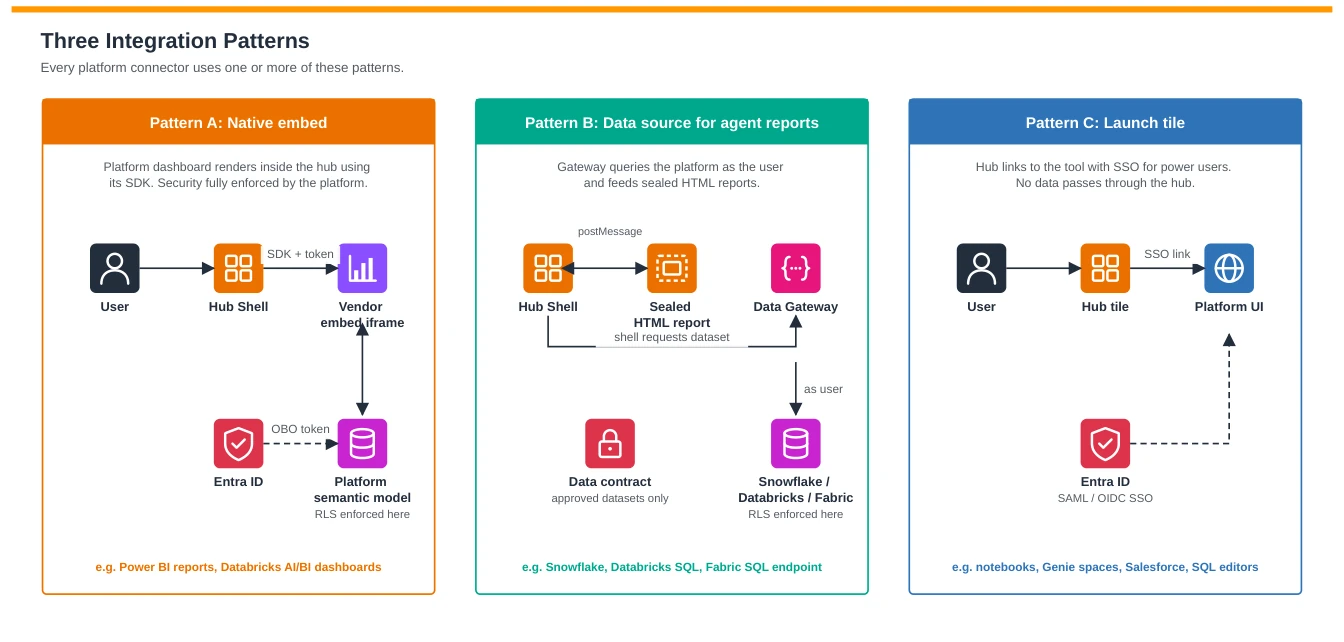
- Pattern A: Native embed
- The platform's own dashboard renders inside the hub using its SDK. Security is fully enforced by the platform.
- Pattern B: Data source for agent reports
- The gateway queries the platform under the user's identity and feeds results to sealed HTML reports.
- Pattern C: Launch tile
- The hub links to the tool with SSO for power users (notebooks, SQL editors, Genie spaces). No data passes through the hub.
Databricks (Unity Catalog, AI/BI Dashboards, Genie)
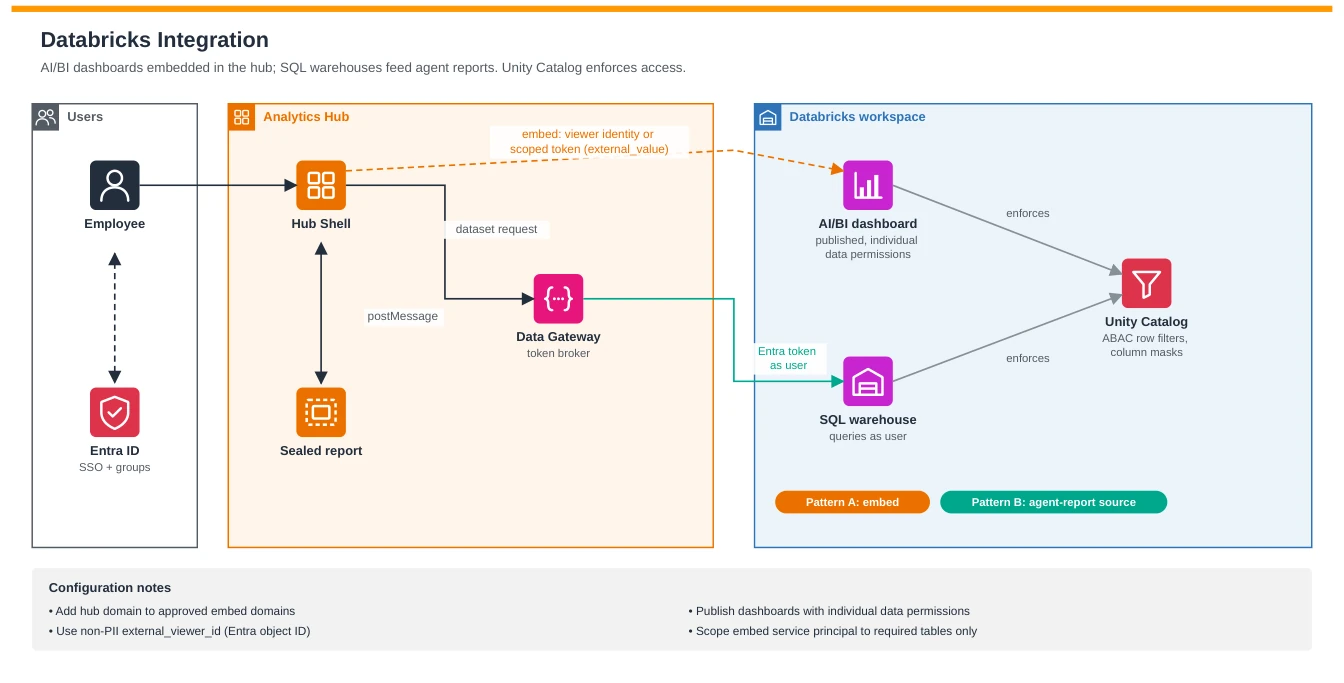
Pattern A: Embed AI/BI dashboards. Databricks supports two embedding modes:
- Basic embedding for users who have Databricks identities. Workspace admins must enable embedding and maintain an approved-domain list; the hub domain goes on that list. Databricks notes this mode requires third-party cookies.
- Embedding for external users, where the application authenticates with a service principal and mints user-scoped tokens carrying
external_viewer_idandexternal_value. Despite its name, Databricks' own guidance shows this working for internal groups too: the backend can sign a scope such asfinance_allderived from the viewer's Entra or Okta group, which dashboard SQL reads as__aibi_external_value.
| Setting | Value |
|---|---|
| Embed mode | Basic embedding for users with Databricks identities (default for internal staff); external-user mode only where cookies or licensing make basic embedding impractical |
| Publish setting | Individual data permissions, which Databricks recommends so queries do not run with the publisher's permissions |
| Service principal | Restricted to the exact tables the dashboard needs, per Databricks best practice |
| Viewer ID | Stable non-PII ID (Entra object ID), since Databricks warns external_viewer_id lands in audit logs |
Microsoft also notes that Azure Databricks dashboards can be shared with any Entra user or group through automatic identity management, which reduces provisioning overhead for the hub's user base.
Pattern B: Data source for agent reports.
- The gateway calls a Databricks SQL warehouse using the user's Entra token (Azure Databricks) so Unity Catalog evaluates the real user.
- Row and column security is defined once in Unity Catalog. Databricks recommends ABAC policies for consistent row filters and column masks across many tables, applied centrally through governed tags so that table owners cannot remove them.
- Agent reports inherit this automatically. A report requesting
margin_by_product_weekfor a regional manager gets only that region's rows because Unity Catalog filtered them.
Pattern C: launch tile for notebooks and Genie spaces, with SSO through Entra.
Snowflake
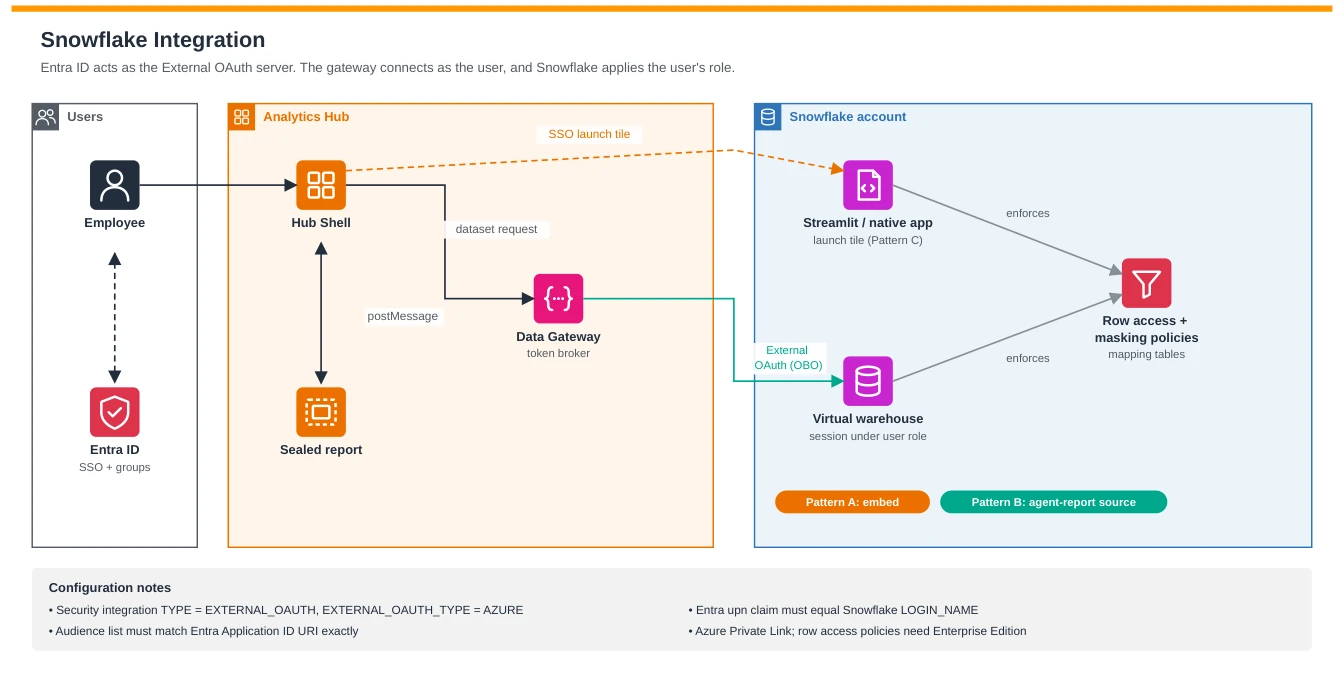
Pattern B (primary): Data source with Entra External OAuth. Snowflake supports Microsoft Entra ID as an External OAuth authorization server. The setup registers a "Snowflake OAuth Resource" app in Entra with scopes that map to Snowflake roles, then creates a security integration in Snowflake:
CREATE SECURITY INTEGRATION ah_entra_oauth
  TYPE = EXTERNAL_OAUTH
  ENABLED = TRUE
  EXTERNAL_OAUTH_TYPE = AZURE
  EXTERNAL_OAUTH_ISSUER = '<entra issuer>'
  EXTERNAL_OAUTH_JWS_KEYS_URL = '<entra jwks uri>'
  EXTERNAL_OAUTH_AUDIENCE_LIST = ('<application id uri>')
  EXTERNAL_OAUTH_TOKEN_USER_MAPPING_CLAIM = 'upn'
  EXTERNAL_OAUTH_SNOWFLAKE_USER_MAPPING_ATTRIBUTE = 'login_name';
This follows Snowflake's documented Entra example. The upn claim must match each user's Snowflake LOGIN_NAME, and the audience must exactly match the Entra Application ID URI, a common setup pitfall that third-party vendors also call out.
- 1User signs into hub
- 2Gateway performs OBOto the Snowflake resource scope
- 3Gateway connectswith the OAuth token
- 4Snowflake validatesand opens a session under the user's role
- Row-level security lives in Snowflake row access policies, which can use mapping tables to decide which rows each role sees and can be applied to many tables from one policy. Column protection uses masking policies. Note that row access policies are an Enterprise Edition feature.
- Network: use Snowflake on Azure Private Link and add only the private account URL to the firewall allowlist.
- Pattern A / C: Streamlit in Snowflake or Snowflake-native apps appear as launch tiles; Snowflake data surfaced in Power BI or Databricks dashboards is embedded through those platforms' patterns.
Microsoft Fabric and Power BI
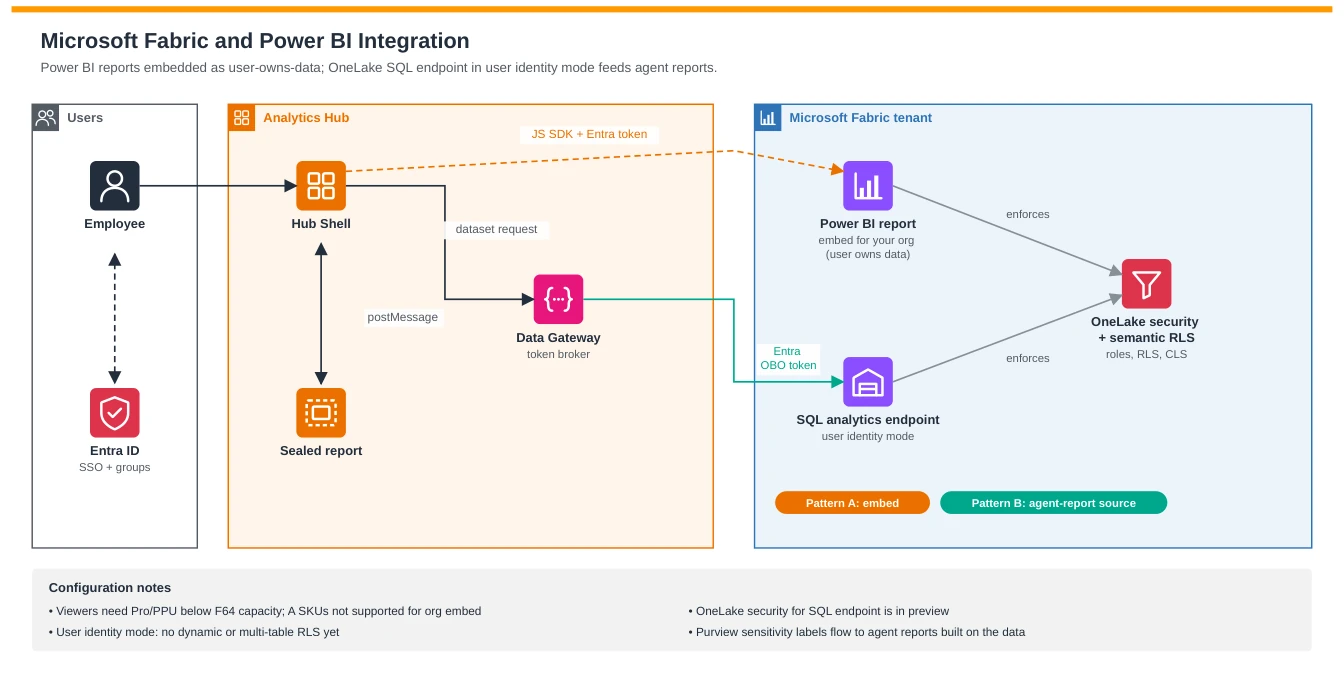
Pattern A: Embed Power BI reports ("embed for your organization"). For internal users, the user-owns-data model has users authenticate against Entra with their own credentials, so existing workspace permissions and RLS apply unchanged. The hub obtains the embed token through OBO and renders with the Power BI JavaScript SDK.
Licensing is a real design constraint. In this model, only F64-or-higher Fabric or P capacities let free-licensed users view content; smaller F SKUs and A SKUs require each viewer to have Pro or PPU, and "embed for your organization" is not supported on A-SKU capacities. This is one reason agent-built reports on top of Fabric data (Pattern B) can be attractive: they avoid per-viewer Power BI licensing for many consumption scenarios, while still respecting OneLake security.
Pattern B: Data source via OneLake / SQL analytics endpoint.
- OneLake uses Entra ID for authentication and maps user identity to Fabric permissions.
- Set the Lakehouse SQL analytics endpoint to user identity mode, where the signed-in user's identity passes through to OneLake and OneLake roles govern reads, including RLS and CLS. This capability is in preview and, in user identity mode, dynamic and multi-table RLS are not yet available, so complex entitlement logic may still belong in delegated mode with SQL security policies.
- The gateway connects to the SQL endpoint with the user's OBO token; agent reports receive pre-filtered results.
Sensitivity labels. Purview sensitivity labels can be applied to semantic models, reports, dashboards, and dataflows, and follow data on export. The hub reads the label of the source item and stamps it onto any agent report built from it, and the gateway uses the label to decide export and model-sharing rules.
Salesforce (CRM and CRM Analytics / Tableau Next)
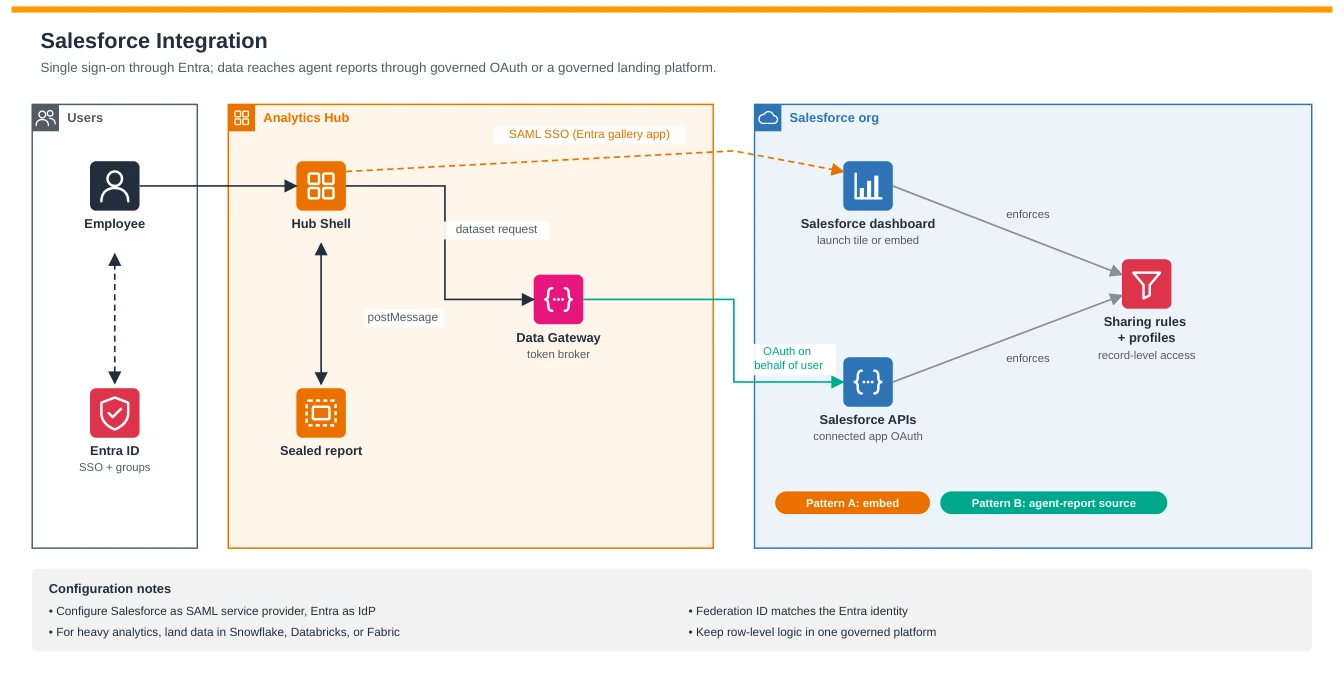
- SSO: Salesforce is configured as a SAML service provider with Entra as the identity provider, using the Entra gallery Salesforce app. Users clicking a Salesforce tile in the hub go straight in without a second login.
- Pattern A: Salesforce dashboards appear as launch tiles or embedded views where Salesforce allows framing of the hub domain.
- Pattern B: The gateway reads Salesforce data through a connected app using OAuth on behalf of the user, so Salesforce sharing rules apply. For heavy analytics, the preferred route is to land Salesforce data in Snowflake, Databricks, or Fabric and govern it there, which keeps all row-level logic in one place.
Other platforms (pattern template)
Any additional tool (Tableau, Looker, Sigma, ThoughtSpot, Qlik, internal APIs) is onboarded with the same checklist:
| Question | Required answer before go-live |
|---|---|
| Does it support Entra SSO (SAML or OIDC)? | Yes, or it is limited to launch-tile only. |
| Can it receive a user-delegated token (OBO, External OAuth, or signed embed token with user claims)? | Yes for Pattern A or B. |
| Where does row-level security live? | Named, and documented in the connector record. |
| Which FQDNs must the gateway reach? | Listed and added to the firewall allowlist. |
| What does the platform log, and can it be correlated to the hub user? | Audit field mapping documented. |
| Can the embed domain be allowlisted on the vendor side? | Yes, hub domain registered. |
Integration summary
| Platform | Primary pattern | Hub → platform auth | Where RLS lives | Notable constraint |
|---|---|---|---|---|
| Databricks | A + B | Entra token / service principal with scoped viewer token | Unity Catalog ABAC row filters and column masks | Approved embed domains; basic embed needs third-party cookies |
| Snowflake | B | Entra External OAuth (OBO) | Row access policies + masking policies | UPN must equal LOGIN_NAME; Enterprise Edition for RAP |
| Fabric / Power BI | A + B | Entra (OBO), user owns data | OneLake security roles, semantic model RLS | Viewer licensing below F64 |
| Salesforce | C + B | SAML SSO; OAuth connected app | Salesforce sharing rules | Prefer landing data in a governed platform for analytics |
09Observability and Audit
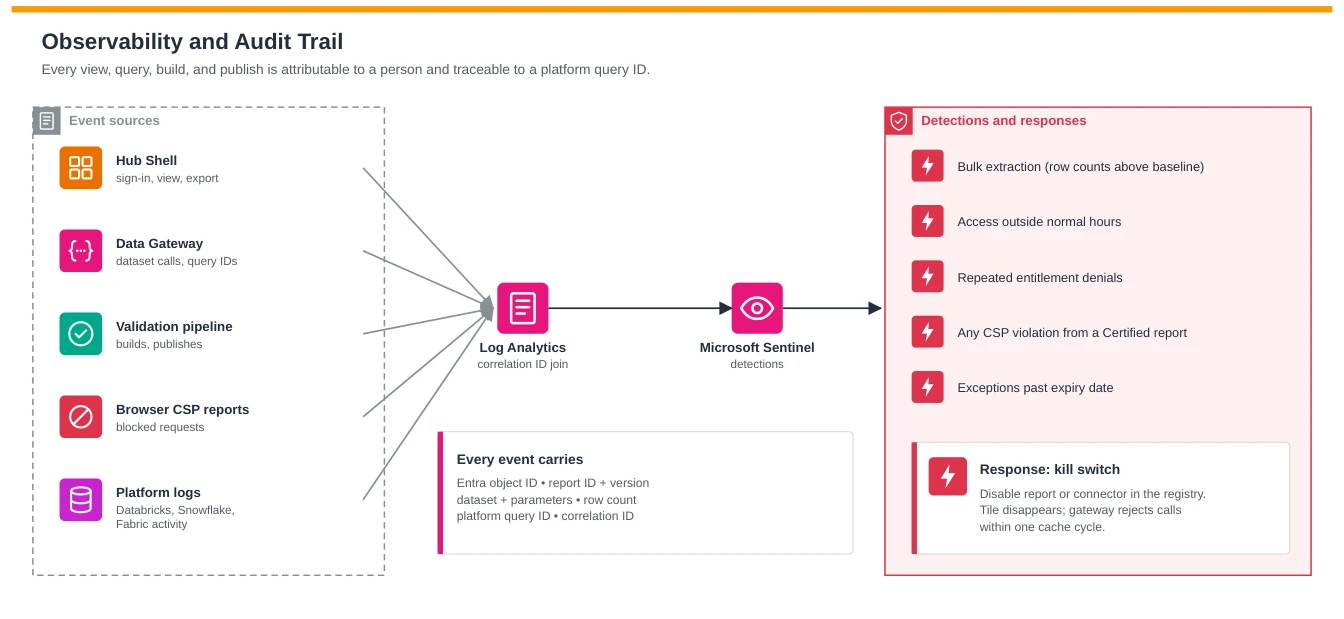
- Hub events: sign-in, catalog view, report open, dataset request, export, build, publish, certification, kill-switch action. All events carry the Entra object ID, report ID and version, and correlation ID.
- Platform correlation: the gateway records each platform's query ID (Databricks query history and
external_viewer_id, Snowflake query ID, Fabric activity log) next to the hub event so investigators can trace a number on screen back to the exact query. - CSP violation reporting: browsers report blocked requests to a hub endpoint; any violation from a certified report is an alert.
- Destination: Log Analytics workspace feeding Microsoft Sentinel, with detections for unusual extraction volume, access outside normal hours, and repeated entitlement denials.
10Deployment Reference (Azure)
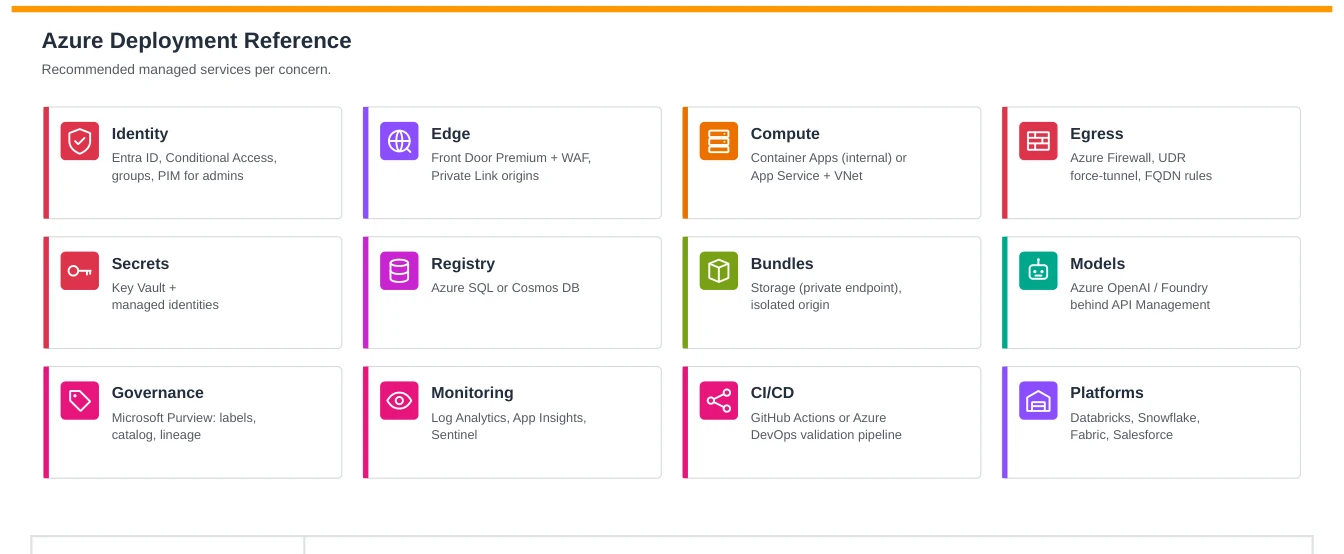
| Concern | Recommended service |
|---|---|
| Identity | Microsoft Entra ID, Conditional Access, Entra groups, Privileged Identity Management for admins |
| Edge | Azure Front Door Premium + WAF |
| Compute | Azure Container Apps (workload profiles, internal environment) or App Service with VNet integration |
| Egress | Azure Firewall (Standard for FQDN rules; Premium if TLS inspection required) |
| Secrets | Azure Key Vault with managed identities |
| Registry and metadata | Azure SQL or Cosmos DB |
| Report bundle storage | Azure Storage (private endpoint) served via isolated origin |
| Model access | Azure OpenAI / Foundry behind API Management, private networking |
| Governance metadata | Microsoft Purview (labels, catalog, lineage) |
| Monitoring | Log Analytics, Application Insights, Microsoft Sentinel |
| CI/CD | GitHub Actions or Azure DevOps running the validation pipeline |
11Key Risks and Mitigations
| Risk | Mitigation |
|---|---|
| Agent-generated code exfiltrates data | Sealed-report pattern: CSP connect-src 'none', sandboxed opaque origin, no credentials, egress firewall. |
| Agent sees more data than requester | Agent tokens obtained via OBO for the requesting user; Restricted data never sent to model. |
| Wrong numbers in a polished report | Data-contract binding to certified semantic models; automated headline reconciliation; certification tiers. |
| Report sprawl | Tiered lifecycle with review dates, auto-expiry for Personal reports, usage-based retirement. |
| Hub becomes a single point of failure | Multi-region Front Door, stateless shell and gateway, platform tools still reachable directly via SSO. |
| Hub entitlement misconfiguration | Two-keys model: source platform RLS still applies. |
| Licensing surprises (Power BI) | Capacity sizing review (see Fabric and Power BI); route broad consumption through Pattern B where appropriate. |
| Preview features change | Track preview dependencies (OneLake security for SQL endpoint, Databricks external embedding) in the risk register and revalidate each quarter. |
12Open Decisions
- Hosting: Azure Container Apps versus App Service for the shell and gateway.
- Semantic layer of record: Power BI semantic models, Databricks metric views, Snowflake semantic views, or a combination by domain.
- Connected-report mode: whether it is allowed in v1 or deferred.
- Model provider and data-classification thresholds for agent prompts.
- External users: whether partners are in scope for a later phase, which would shift Databricks and Power BI to app-owns-data embedding.